
Query fan out: a quick Q&A to get you up to speed
Learn what query fan out is, how AI search platforms use it, and how fan-out queries can inform SEO and GEO optimisation.

At a glance:
- Query fan-out is the mechanism AI search platforms use to run related web searches and retrieve information needed to answer a user’s prompt.
- Monitoring fan-out queries can help show where your website, competitors and other brands are appearing in the traditional search results that may feed an AI response.
- Fan-out queries should be treated as a directional SEO signal rather than a new list of keywords that all require individual optimisation.
- Grouping recurring fan-out queries by topic and intent can help identify optimisation opportunities, content gaps and competitor patterns.
- In ChatGPT, fan-out queries can be inspected through the browser network response, while larger-scale analysis can be handled programmatically or through third-party platforms.
What is query fan out?
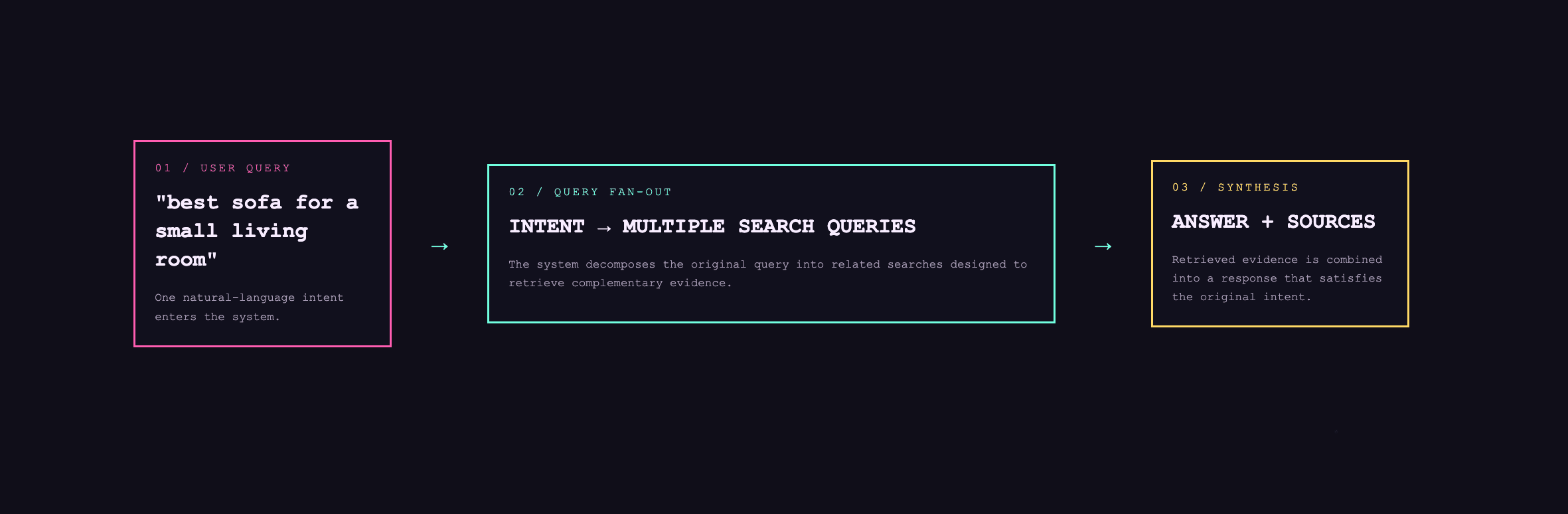
Query fan-out is the mechanism used by AI search platforms to retrieve relevant information for a given search/prompt.
Simply put, it’s literally the web searches an AI platform makes when it needs to retrieve a variety of information to cover different aspects of the user’s search/prompt to serve back to answer that prompt.
For example, if someone inputs a prompt such as:
“Find me a whitewashed sideboard that is narrow enough to fit into my slim corridor, preferably made of solid wood”
The AI platform will make a variety of subqueries that are broadly related to the original user prompt to answer the original prompt.
The precise subqueries will vary, but for illustrative purposes in this case; the fan out queries could be things like:
- narrow whitewashed sideboards under 35cm deep
- solid wood whitewashed sideboards UK
- best sideboards for narrow hallways
- sideboard vs console table for a slim corridor
- whitewashed oak sideboard dimensions
- narrow solid wood sideboards with storage
With each query, the AI search platform searches a search engine and fetches information from the pages that rank for those queries. Then it creates an answer to the original prompt by combining content from selected relevant sources found during the fan out query searches to create the final response.
What can we use query fan out for?
If you monitor fan-out queries across multiple search prompts, it’s possible to start seeing where your website is, and is not, consistently showing up in traditional search results for those queries. Which may mean your website is less likely to be used as a source or recommendation in the AI search response.
Furthermore, understanding which brands and competitors are ranking for fan out queries allows you to assess what might be needed to increase rankings for your own website.
What does this mean for SEO?
Fan-out queries for SEO should be treated as a directional signal rather than a list of keywords that you must start optimising for.
If you collect fan out queries for prompts that are reflective of what your customers might search you can work through an optimisation and gap analysis process:
- Group recurring queries by intent and topic
- Map fan-out queries to existing PLPs, products, and editorial/blog pages
- Review where your pages rank for fan out queries, and identify where optimisation or content improvements can be made
- Identify gaps for where you do not rank for fan out queries and create new content only where there is a genuinely distinct customer need
- Assess competitor ranking landscape to identify formats and page types that are repeatedly retrieved, determine whether you can or should replicate to outrank
How does optimising for fan-out queries benefit SEO and GEO?
Understanding your fan-out queries and identifying how you should better optimise can help drive visibility in both Google and Bing, in doing so, you are aiming to influence the eventual AI search answer.
How to extract fan out queries from ChatGPT
You can easily see if fan-out queries have been generated from a ChatGPT search by following these simple steps:
- Input your prompt in ChatGPT and hit go
- In the URL address bar, grab the conversation ID your search has just generated, it’s the alphanumeric string after /c/
- Open developer tools (right click anywhere and click “inspect”, or press F12)
- Click on the network tab at the top of the inspect pane
- Refresh the page and then paste your conversation ID in the filter (from step 2)
- Open the matching Fetch/XHR request and select ‘response’
- Search using ctrl+f for “queries” or “search_model_queries” to see what is presented as the fan out query
(NB: for Gemini you need API access to gather the fan out queries)
Of course, doing this one by one limits your ability to devise insights and optimisations for sitewide updates. Running this at scale can be done programmatically by scraping results directly from chat applications or by using a third party platform (which will scrape the results for you) such as DataForSEO.

Bart is the Managing Director at Melt Digital, leading the agency's strategic vision and client relationships. With over 15 years of experience in SEO and digital marketing, he specialises in technical SEO, ecommerce optimisation, and data-driven search strategies.
Related Articles

Shopify Catalog: What is it and why is it important in agentic search
Shopify Catalog gives AI platforms and shopping applications structured access to product data. Learn how it works and why it…
Read more
How confident should you be that AI content is treated as 'Google friendly'
Since the introduction of Generative AI content tools, there's been no shortage of warnings about using them to create content…
Read more
What is llms.txt and do you need one?
Since llms.txt convention was first suggested back in 2024, it has been criticised and slow to adopt - is it…
Read moreReady to Boost Your Organic Traffic?
Let's discuss how Melt Digital can help transform your SEO strategy.
Get in Touch